

Does GameChanger have a public API?
Last updated: August 22, 2026
No public GameChanger API is available for ordinary coach, parent, team-admin, or third-party developer workflows. There is no public GameChanger API key request, public developer documentation, public OAuth connection, public webhook system, or public Zapier integration for pulling team stats into another app.
If your goal is to analyze GameChanger stats outside the app, use the data paths that exist today: stats exports, CSV files, or completed-game GameChanger play-by-play.
We checked GameChanger's public product site and GameChanger University on August 22, 2026. We found public product and scorekeeping help, but no public developer portal, API-key request, OAuth guide, or third-party stats API documentation.
GameChanger API documentation, API key, and developer account answers
Public API documentation
There is no public GameChanger developer portal or API documentation page for coaches, parents, or third-party tools to sign up against.
API key or developer account
There is no public API key request flow or developer account signup for these workflows, so there is nothing official to apply for.
What to do instead
Use the export, CSV, and completed-game play-by-play paths that already exist, then move that data into a workflow you can search and keep.
What people usually mean by “GameChanger API”
Most people searching this phrase are not asking for developer documentation just for fun. They are trying to solve a real team problem: stats are stuck in one app, one staff login, or one season workflow, and they want to analyze, share, or preserve that data somewhere they actually control.
If that sounds like you, the real need is data access and organization, not a theoretical API.
What exists instead of a public API
While there is no open public API, there are still a few practical ways to get your stats out. Depending on the team setup and role permissions, that may include season exports, game-level exports, or GameChanger play-by-play you can copy and organize.
- Season export files for stats analysis
- CSV workflows you can preserve outside the app
- Game-level outputs that preserve the scoring record
- Play-by-play text you can save and rebuild from later
Why people hit a wall anyway
Getting the file is only the first step. Families and team admins usually still need to clean it up, search it, compare players, verify a few rows, and keep the season organized in one place. That is the gap most “GameChanger API” searches are really pointing at.
What is still missing if you only have the export
Searchable season history
A raw export is useful for one download, but not great when you need to compare multiple games, players, or imports across the season.
Corrections and review
Most teams eventually need to revisit a few rows, especially when the original scorekeeping was rushed or a hit was marked as an error.
Coach-facing decisions
Exports alone do not give you lineup recommendations, defensive alignment help, or a printable lineup card you can carry to the field.
How GC Stats helps
GC Stats is built around the data you can actually get. Instead of waiting for a public API, you can work from exports and GameChanger play-by-play, correct rows when needed, keep the season searchable, and carry the data with you.
The value is simple: you get a usable stats workflow today, without depending on a closed system to suddenly open up.
Export path
When your role has access, export GameChanger stats and bring the CSV into a workflow that preserves team and season context.
Play-by-play path
When export access is missing, copy completed-game GameChanger play-by-play and use GC Stats to create portable CSV, Excel, JSON, or TXT output.
Coach workflow
Once the data is saved, use searchable stats, corrections, coach insights, lineup recommendations, and printable lineup cards.
What this looks like inside GC Stats
Import what you can access
Bring in the export or saved GameChanger play-by-play you already have instead of waiting for a direct API connection that does not exist.
Review the rows that matter
Search by player, game, or stat type and quickly revisit anything that deserves a second look.
Keep a season record you control
Teams, seasons, and raw numbers stay portable instead of living in one closed account forever.
Turn stats into coach decisions
Coach Insights uses the saved season data for batting-order help, defensive recommendations, situational standouts, and printable lineup cards.
What you do instead of a public API
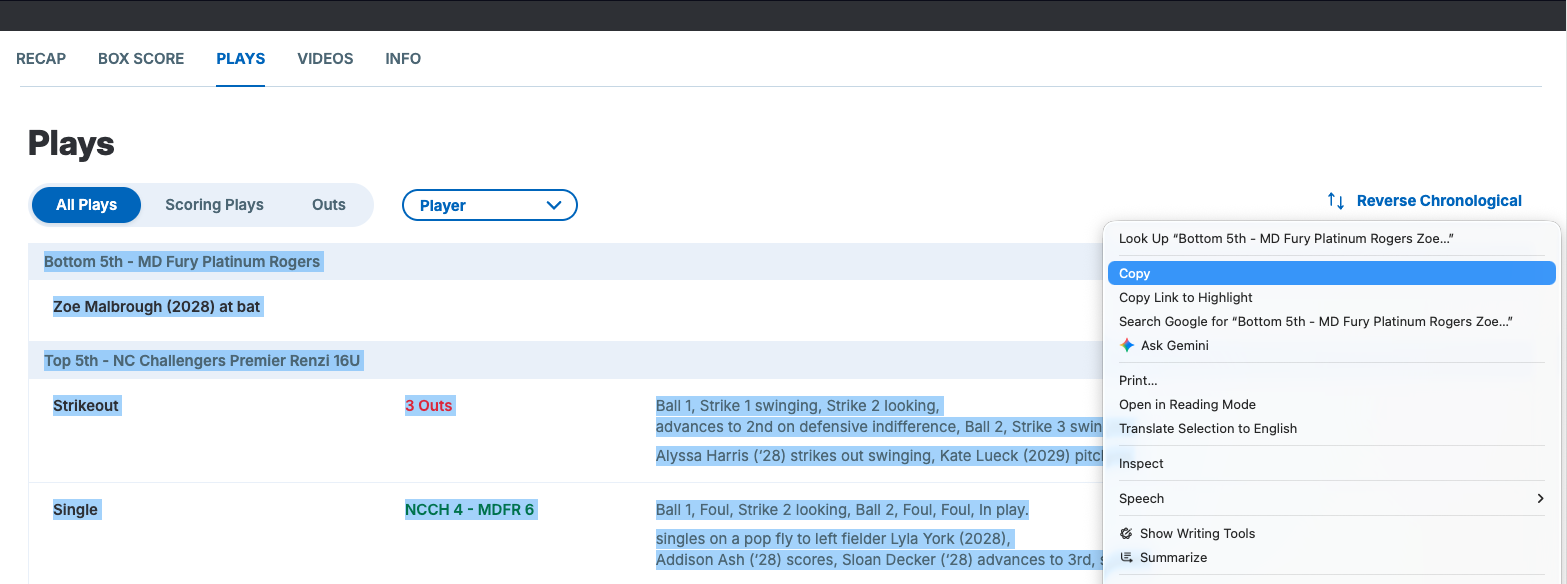
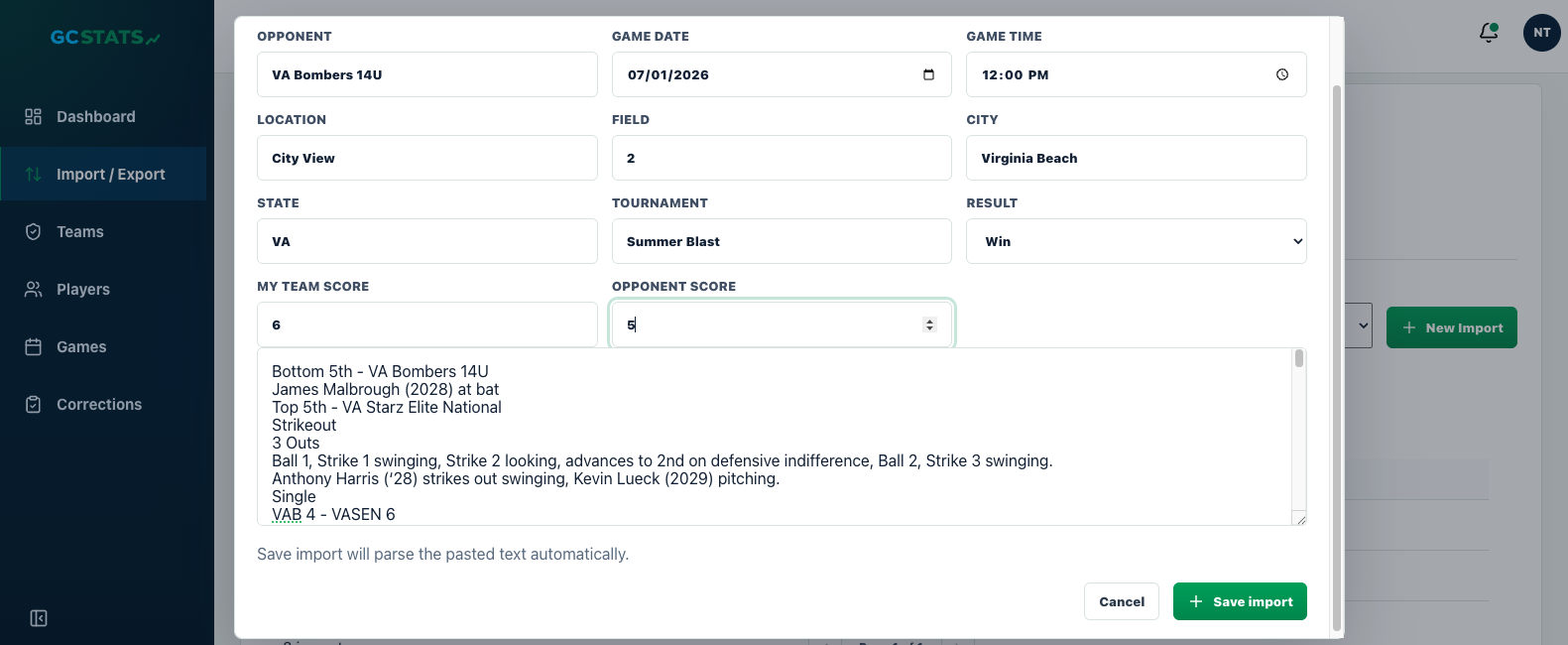
1. Copy the GameChanger play-by-play
Start with the completed game in GameChanger and copy the GameChanger play-by-play so the raw sequence of events is preserved before anything gets cleaned up.
2. Save the game context with the text
Opponent, date, location, tournament, score, and result stay attached to the pasted GameChanger play-by-play instead of getting separated from the raw text.
3. Let the import become searchable season data
Once saved, that text is no longer trapped in one note or app view. It becomes part of a season record you can search and review.
4. Keep moving without a public API
This is the real workaround: use the data you can access today, then turn it into something portable and usable instead of waiting on an official integration.
What people usually want to do with a GameChanger API
Build a dashboard
Use imports, search, filters, and season views instead of re-cleaning a spreadsheet every time you want a new answer.
Share stats outside one login
Parents and staff can keep a portable season record instead of depending on whoever controls the original account.
Make lineup decisions
Use saved stats to support batting-order choices, defensive alignment, and printable lineup-card prep.
Keep softball and baseball data usable
GC Stats is built for both sports, especially teams dealing with travel-ball or season-long stat cleanup.
If you really need the step-by-step import path
The fastest manual workflow is straightforward: copy the completed-game GameChanger play-by-play, paste it into GC Stats, save the game context, and let that import become part of your searchable season record.
If you are here because a coach or parent just wants to get one game into GC Stats, use the play-by-play import guide instead of hunting for API docs that do not exist.
FAQ
Does GameChanger have a public API?
No. As of August 3, 2026, there is no public GameChanger API for coaches, parents, or third-party developers.
Does GameChanger have webhooks, OAuth, or Zapier?
No public developer platform is available for those workflows, which is why most teams fall back to files and manual season organization.
Can I still analyze GameChanger data?
Yes. The practical path is to use export files, CSV workflows, and GameChanger play-by-play, then move them into a tool that makes the season searchable and easier to review.
Can GC Stats connect directly to my GameChanger account?
No. GC Stats is intentionally built around the data you can actually access today instead of promising a direct GameChanger integration that does not exist.
Can I get a GameChanger developer account or API key?
No. GameChanger does not offer public developer signups or API keys, so there is no application process to go through.
Can I automate pulling my GameChanger stats?
Not through an official integration. The practical path is exporting or copying play-by-play manually after each game, then letting GC Stats keep it organized and searchable.
Who is this for?
Parents, coaches, team admins, and anyone trying to keep softball or baseball stats usable outside one locked account.